Navigation
Install the app
How to install the app on iOS
Follow along with the video below to see how to install our site as a web app on your home screen.
Note: This feature may not be available in some browsers.
More options
-
Welcome to EcoDieselRam.com We see you haven't REGISTERED yet.
Your truck knowledge is missing!
- Registration is FREE , all we need is your birthday and email. (We don't share ANY data with ANYONE)
- We have tons of knowledge here for your EcoDiesel truck!
- Post your own topics and reply to existing threads to help others out!
- We believe in quality OVER quantity, and a family friendly place for your #EcoDiesel home!
Already registered, but need a PASSWORD RESET? CLICK HERE TO RESET YOUR PASSWORD!
You are using an out of date browser. It may not display this or other websites correctly.
You should upgrade or use an alternative browser.
You should upgrade or use an alternative browser.
BlueDriver settings
- Thread starter NPV
- Start date
I'm assuming the bluedriver is an OBD2 reader? What app are you monitoring with, I used a scangauge2 and programmed it for soot mass & REGEN status, those will be the most important IMO, but there is one exhaust temp that may help, I think it is SCR temp. My 2017 doesn't display any After treatment status which is why I purchased aftermarket OBD 2 gauges. I'm now using an EDGE CTS 3, but think I should have bought a CTS 2.
- Thread starter
- #3
Thanks. BlueDriver is an OBD reader with its own app. I figured out on a recent trip to Seattle towing an airstream which parameters would be helpful. The BlueDriver has some faults. The product rep told me I need to upgrade the software. Hopefully that will help.

John Jensen
Well-Known Member
- Mar 22, 2016
- 954
- 495
- Truck Year
- 2016
Pertinent data that I monitor with an Edge CTS3:
Regen on or off
% soot (active regen starts at 66% if coolant temps are at proper level)
EGT3 is DPF Inlet (active regen data)
Exhaust manifold temp (overheating/overloading causes engine breakdown)
EGT1 is pre-turbo (exhaust manifold temp - sensor in passenger side exhaust manifold)
The remaining EGT sensors:
EGT2 is DOC Inlet (After turbo) No need to monitor
EGT4 is SCR Inlet (DPF outlet - the DEF user) No need to monitor – no PID available
I monitor 8 more PIDs for misc things none related to exhaust or regen data.

Ecopete
Active Member
- Dec 27, 2019
- 166
- 28
- Truck Year
- 2014
I use bluedriver as well, but I'm curious as to what faults you are experiencing?Thanks. BlueDriver is an OBD reader with its own app. I figured out on a recent trip to Seattle towing an airstream which parameters would be helpful. The BlueDriver has some faults. The product rep told me I need to upgrade the software. Hopefully that will help.
Now I did notice that the app needs to be closed when truck is shut off as it doesn't automatically reconnect on start up if left running.
- Thread starter
- #6
The unit disconnects randomly. To get it working again I have to reboot the iphone and then re-enter the parameters I want to monitor. For me, its all about continuously monitoring the DPF when pulling a travel trailer. I'm trying to make sure I don't get into a limp mode situation far from home.
- Thread starter
- #7
Pertinent data that I monitor with an Edge CTS3:
Regen on or off
% soot (active regen starts at 66% if coolant temps are at proper level)
EGT3 is DPF Inlet (active regen data)
Exhaust manifold temp (overheating/overloading causes engine breakdown)
EGT1 is pre-turbo (exhaust manifold temp - sensor in passenger side exhaust manifold)
The remaining EGT sensors:
EGT2 is DOC Inlet (After turbo) No need to monitor
EGT4 is SCR Inlet (DPF outlet - the DEF user) No need to monitor – no PID available
I monitor 8 more PIDs for misc things none related to exhaust or regen data.
Thanks. I am monitoring the same with the Blue Driver when pulling my travel trailer. Hopefully it will allow me to avoid the dreaded limp mode when camping.

Highmarkmiked
New Member
- Aug 21, 2020
- 7
- 2
- Truck Year
- 2015
Hello Im new, I apologize for jumping in on this thread, but I was hoping you guys with some past knowledge could help me with my newly purchased CTS3 monitor. I bought it expecting to hook it up and see all these parameters that people are talking about, regen, soot level, multiple egt's, all the things I wanted. I cant figure out what Im doing wrong with the monitor as I see none of these. Ive got a 2015 ecodiesel, is it my truck ecm that wont allow access?? Did I just by a fancy dash light that tells me rpm and speed. Please clue me in if you can.
John Jensen
Well-Known Member
- Mar 22, 2016
- 954
- 495
- Truck Year
- 2016
You have to search, select and install the screens that you want to use, up to three. You have to search, select and install the PIDs you want to use and where on your screen you want them to appear. If you want any warnings or alerts you have to select and install for each PID. The only PIDs that appear automatically are the ones that Edge puts on every new unit.
Here's what I am monitoring:
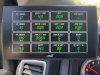
Here's what I am monitoring:
Highmarkmiked
New Member
- Aug 21, 2020
- 7
- 2
- Truck Year
- 2015
Thanks for the help John. So I have all the same PID's, I just need to figure out how to access them. I did not see the option to pull these in. Ill have to read the instructions better I guess. Thanks again.You have to search, select and install the screens that you want to use, up to three. You have to search, select and install the PIDs you want to use and where on your screen you want them to appear. If you want any warnings or alerts you have to select and install for each PID. The only PIDs that appear automatically are the ones that Edge puts on every new unit.
Here's what I am monitoring:
View attachment 3060
John Jensen
Well-Known Member
- Mar 22, 2016
- 954
- 495
- Truck Year
- 2016
You'll find it's very easy. Once you get the screen you want to use just double tap any PID. That will bring up a menu of PIDs by type. Just select the one you want and it will replace the one you tapped. The PIDs IMO are not indexed well, you just have to keep searching around the menu to find what you wand.Thanks for the help John. So I have all the same PID's, I just need to figure out how to access them. I did not see the option to pull these in. Ill have to read the instructions better I guess. Thanks again.
Also. if you tap the bottom of the screen a menu of things you can do will appear. Such as the search for trouble codes
Highmarkmiked
New Member
- Aug 21, 2020
- 7
- 2
- Truck Year
- 2015
Im confused now because I did do the double tap on each PID and the list that came up was minimal, I didn't see any egt's or the other parameters that your monitoring??? Ill have to have another look tonight. Are they disguised with odd names, because I did see a bunch of knock sensor stuff and other labels which meant nothing to me??You'll find it's very easy. Once you get the screen you want to use just double tap any PID. That will bring up a menu of PIDs by type. Just select the one you want and it will replace the one you tapped. The PIDs IMO are not indexed well, you just have to keep searching around the menu to find what you wand.
Also. if you tap the bottom of the screen a menu of things you can do will appear. Such as the search for trouble codes
John Jensen
Well-Known Member
- Mar 22, 2016
- 954
- 495
- Truck Year
- 2016
You are probably looking at the standard menu. Click on the advanced tab
Highmarkmiked
New Member
- Aug 21, 2020
- 7
- 2
- Truck Year
- 2015
Ill give that a try, theres no way the 2015 doesn't allow access to these parameters? thanks again for your help JohnYou are probably looking at the standard menu. Click on the advanced tab